Version 4.60.3 · Windows
Official, transparent download.
Analyze Parquet, CSV, Excel, JSON, R and GIS data on your own PC. The complete app is free, requires no account and does not upload your data.
Microsoft-certified install · No SmartScreen warning · Automatic updates.
Alternative download
Can't use Microsoft Store?
Only if you need it, there is a .exe installer on GitHub Releases. It is not code-signed, so Windows will show “Windows protected your PC”; download it and follow this guide to unblock it.
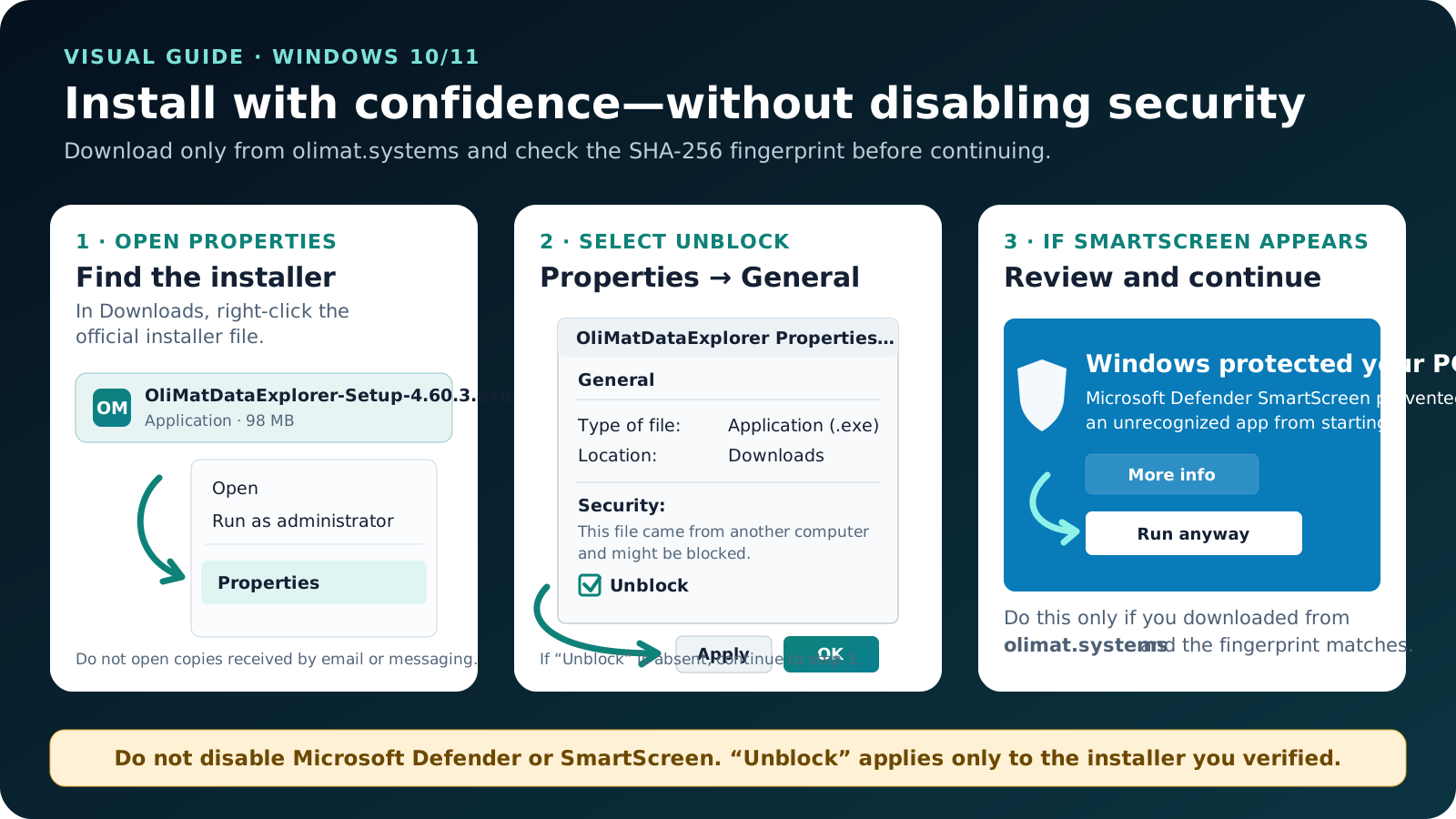
- Open Properties. In Downloads, right-click the official installer and choose Properties.
- Unblock only this file. On General, if Security → Unblock appears, check it and select Apply → OK.
- Continue in SmartScreen. If “Windows protected your PC” appears, select More info, confirm the file name and choose Run anyway.
Do not turn off Microsoft Defender or SmartScreen. Unblock only the installer downloaded from this page after its fingerprint matches.
Before installing
Requirements and provenance.
The installer is delivered by the project's official GitHub Release. Do not use copies forwarded by email, messaging apps or third-party download sites.
Verify the file with SHA-256
Open PowerShell in your Downloads folder and run:
Get-FileHash .\OliMatDataExplorer-Setup-4.60.3.exe -Algorithm SHA256The result must match character for character:
9f28cd1f743077d0d70002b66d9ab0d7f41d1d6c0204e341639946a51c7893f4
If it does not match, do not run it. Delete that copy, download again from this page and contact us.
Highlights
- Portable
.pvpwprojects with their own icon and full context. - Double-click and “Open with” integration for compatible formats.
- Installer, website and update manifest aligned to the same version.
- Interface self-test and optional dependencies included.
Explore all 12 modules and features · Parquet viewer for Windows
Your data is processed locally
No account is required and your files are not uploaded to OliMat. Base maps may request tiles from their providers while online. Read the privacy policy.
Complete, free application
The license permits free use and distribution of the complete application for personal, academic, institutional and commercial purposes, subject to its terms. Third-party components retain their own licenses.
Did something differ from the guide?
Tell us the message you see and your Windows version. Do not send files containing sensitive data.